
Skip to content
FortiSafe Antivirus

Check whether your apps and files have a possible match with known signatures.

FortiSafe compares your apps and files with databases updated every day, on the device itself. Your files aren't sent to anyone.

Start 7 days free

Android only. After the trial, US$ 1 a month or US$ 10 a year, in your currency, on Google Play, with automatic renewal until you cancel.
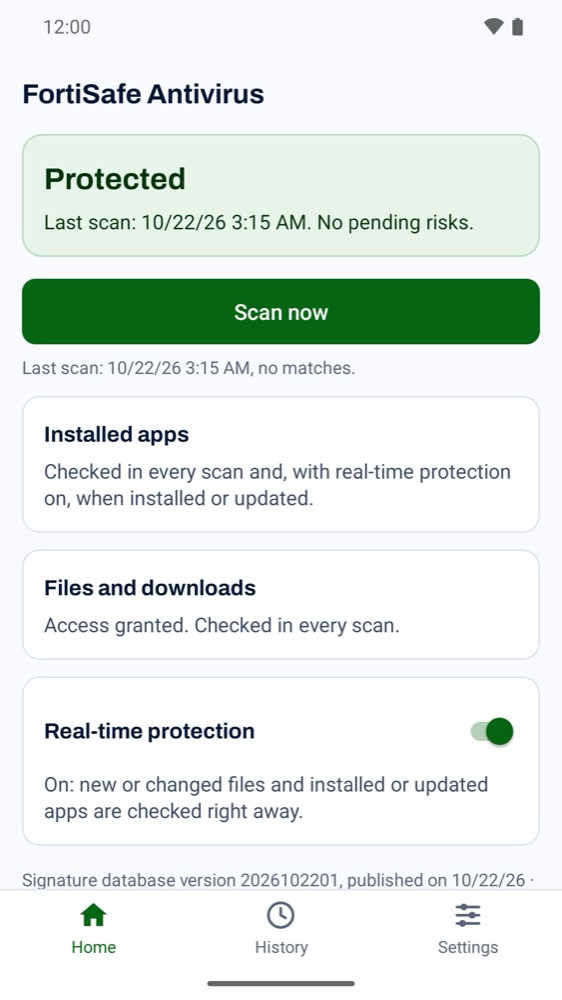
FortiSafe Antivirus home screen, with the latest scan and real-time protection turned on

What it checks

  • Installed apps

    The files of each app in the current user profile, only after you agree, on a screen of its own.

  • Downloaded files

    Shared storage, such as the Download folder, with the access you grant. Up to 500 MB per file.

  • Every new app

    With real-time protection on, each app is scanned right after it's installed or updated.

  • Monitoring apps in the public databases

    Including some offered as parental control or device location. If you installed it yourself, you can ignore the alert.

If you suspect someone installed an app to watch you, removing it may alert that person. First, seek support from someone you trust or a support service in your country.
How to start

  1. Install it from Google Play.
  2. Sign in with the code sent to your email. The account keeps your email, activated devices and subscription.
  3. Start the 7-day trial and run your first scan.
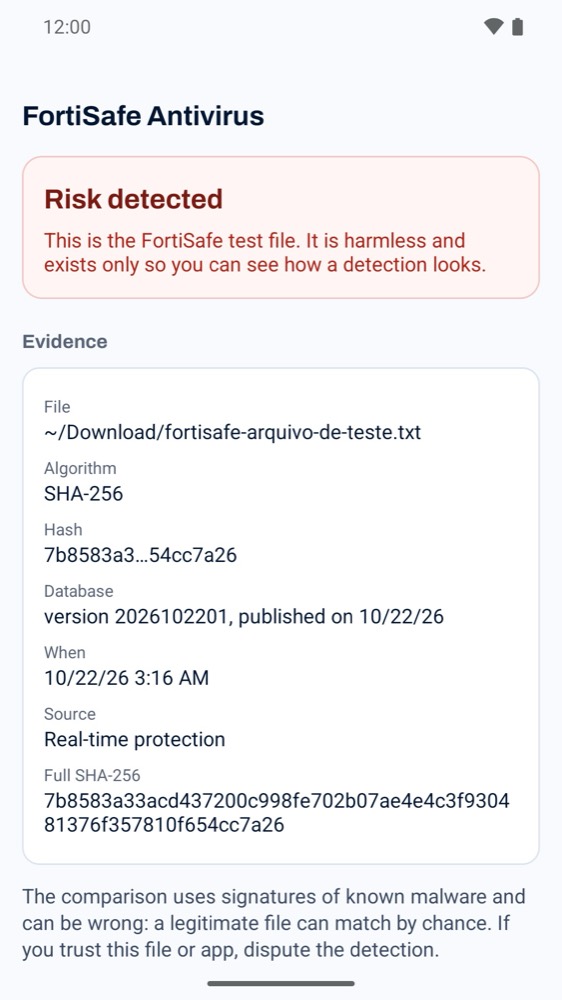
Risk detected alert in FortiSafe Antivirus, with the file, the hash and the database date

When it finds something

The alert shows the evidence: the file, the hash and the date of the signature database.

A match can be a false positive. That's why the app presents it as possible, not certain, and offers “Dispute”. For a second opinion, it can open VirusTotal in your browser, with the file's hash. It asks you first.

You decide. FortiSafe removes nothing on its own.

What it doesn't do

FortiSafe compares each file with signatures of known malware. Beyond that:

  • It doesn't filter websites or links.
  • It doesn't analyze app behavior and doesn't use heuristics.
  • It doesn't recognize new or modified malware that isn't in the databases yet.
  • It doesn't open compressed files, such as ZIP: it scans each whole file, as it is.
  • It doesn't scan the Android/data and Android/obb folders.
  • It doesn't intercept other apps' traffic.

Privacy

  • Your files, their names and the list of your apps aren't sent to anyone. Only what you send yourself when disputing an alert leaves your device.
  • The internet is used to download the databases from the FortiSafe server and for the account and license, over HTTPS.
  • VirusTotal only opens when you ask.
  • No ads and no trackers.

The app is distributed under the AGPL-3.0 license.

The databases come from ESET Research (malware-ioc), Echap (stalkerware-indicators) and MalwareBazaar, by abuse.ch. FortiSafe isn't affiliated with them, and none of them endorses this app.

Privacy policy · Delete the account

Price

It covers 1 device. Billing and cancellation are on Google Play, which shows the price in your currency.

What we recommend

Yearly

US$ 10 a year

One payment, valid for 12 months

Start 7 days free

7 days free if you haven't used the trial yet. Without an active subscription, the app doesn't scan or protect the device.

Common questions

Android already has Play Protect. Do I need this?
Keep Play Protect on. FortiSafe adds a second check, with public databases of known malware, and shows the evidence for each alert.
Am I charged during the trial?
No. The 7-day trial applies if you haven't used it yet. If you don't cancel before it ends, Google Play starts charging the plan you chose.
How do I cancel?
On Google Play, under Payments and subscriptions, then Subscriptions. Uninstalling the app doesn't cancel the subscription.
What happens if I cancel?
You keep using it until the end of the paid period. After that, the app doesn't scan or protect the device.
Does it work on iPhone?
No. FortiSafe Antivirus is Android only, version 5.0 or later.
Can I use it on two phones?
The subscription covers 1 device at a time. If you change phones, just replace the old device when you sign in on the new one, with no limit on changes.
What if it warns about an app I trust?
The alert is a possible match with known signatures and can be a false positive. You see the evidence and decide what to do. To dispute it, tap “Dispute” in the app and send it to [email protected]: we reply within 5 business days. Nothing is removed without your decision.
Do you see my files?
No. The comparison happens on the device, and your files, their names and the list of your apps aren't sent to anyone. If you ask for a second opinion, VirusTotal receives only the file's hash, in your browser. If you dispute an alert, the message you send includes the file name, the app and the hash.
Do I need an account?
Yes. You sign in with a code sent to your email, with no password. The account keeps your email, activated devices and subscription.
Who is behind it?
Tascom Global Network LLC, from Orlando, Florida. Support is at [email protected].

See what it finds on your Android.

Start 7 days free

Android only. After the trial, US$ 1 a month or US$ 10 a year, in your currency, on Google Play, with automatic renewal until you cancel.